Joining on behalf of a Large Group
A maximum of 20 participants can be entered when joining a Super Radiance session.
This page describes the process for entering a larger number of participants.
Requesting an authorization code
Contact us to request an authorization code that will allow you to enter a larger number of participants.
We will need to know:
- Your name
- Your email address
- The name of your group
We will then email you an authorization code.
Using the authorization code
When you join a Super Radiance session, enter the authorization code at the beginning of the name field followed by a space and the name of the group. For example, if your authorization code is @1234, you would enter:
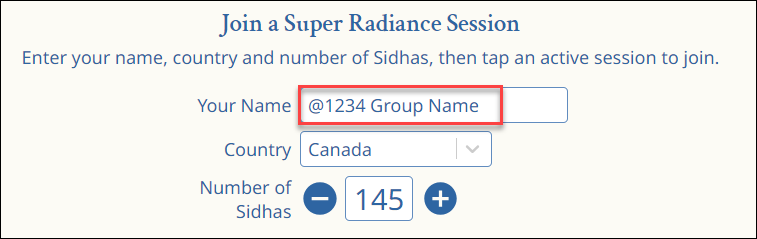
TIP: You can leave the authorization code permanently in the name field if you wish. It is not displayed in the Participants list.
Entering participants if you don’t know the final number
This is the recommended approach if you don’t know the final number of participants.
- Join the session before program starts with your best guess of the number of participants. This will let others see that they are doing program with your group.
- When you know the actual number of participants, go back to the home page, adjust the number, and rejoin the session. This will update the number of participants.
Joining on behalf of multiple groups
If you are joining on behalf of multiple groups for the same liftoff time:
- You can use the same authorization code for all groups.
- You MUST use a separate browser or a separate device for each group. Otherwise your entry for the second group will overwrite the first group and the first group will not be counted.
For example, you could use Chrome for one group and Safari for the other group, or use your phone for one group and your laptop for the other group.